Select the model you want to generate your video with.

Model Version

Same orientation as the reference video. Supports up to 30s video generation.

No Watermark

Private

Kling 2.6 Motion Control Free Online

Key Features of Kling 2.6 Motion Control for Video Creation

Continuous Performance Flow with Kling 2.6 Motion Control

Expressive Character Acting Powered by Kling AI Motion Control

Stable Complex Movement with Kling AI 2.6 Motion Control

30s Cinematic Motion Creation with the Kling AI Video Generator

How to Create Motion Videos Free on VideoMaker.me with Kling 2.6 Motion Control

Getting started with Kling 2.6 Motion Control on VideoMaker.me is designed to fit naturally into a video creation workflow rather than feel like a technical setup. You can explore the feature free while learning how different motion inputs influence the final result.

Step 1: Upload a motion video

Step 2: Upload a character image

Step 3: Generate and refine your clip

Kling VIDEO 2.6 Motion Control Compared with Other Motion Models

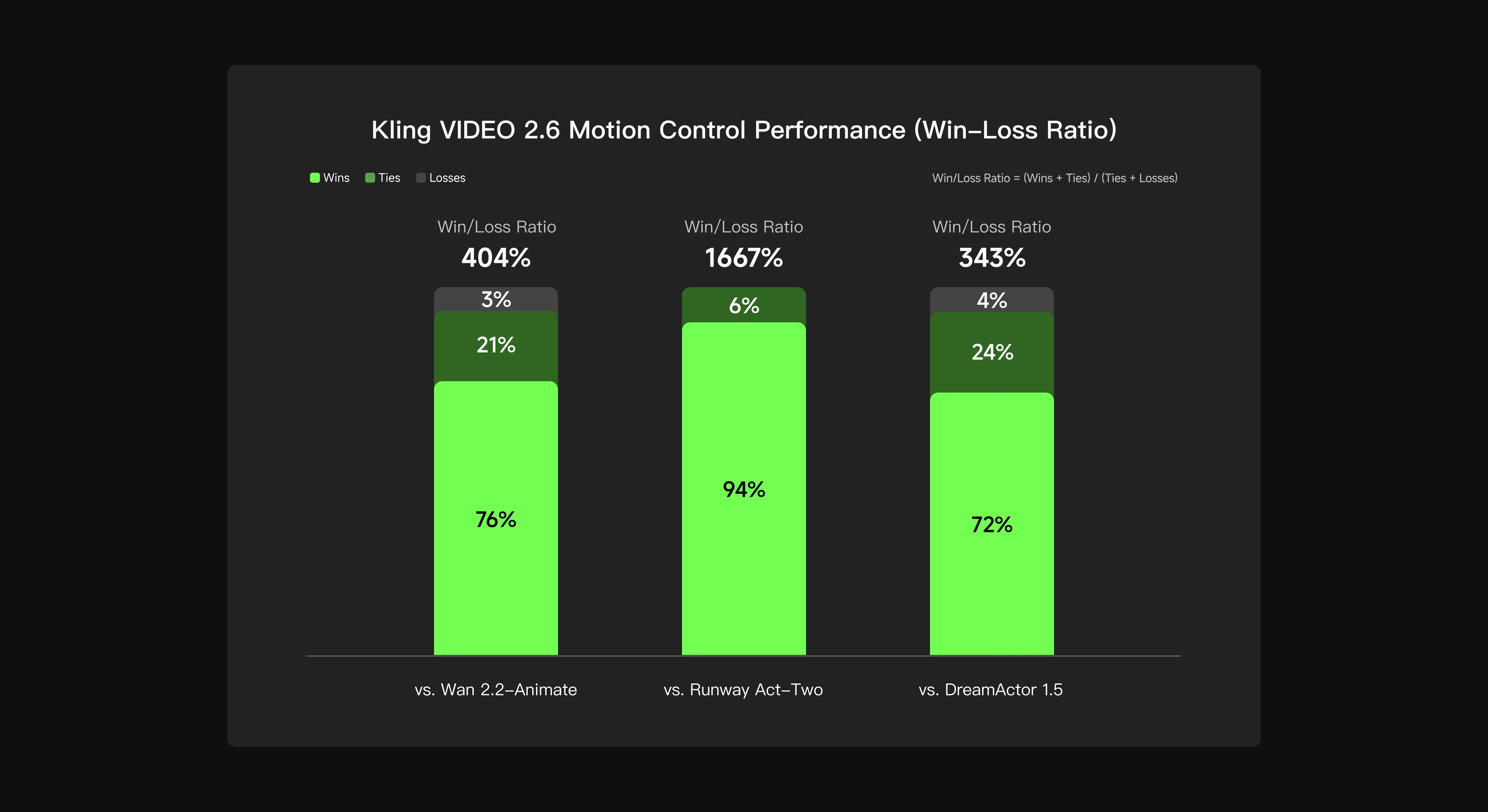
Kling VIDEO 2.6 Motion Control was evaluated using an internal benchmark dataset built by the Kling AI team and compared against Wan 2.2 Animate, Runway Act-Two, and DreamActor 1.5 through structured blind preference testing. The assessment covered multiple dimensions of motion quality, including facial expression consistency, dynamic continuity, image stability, motion realism, and overall visual coherence across different character types and styles. According to the reported win–loss ratio, Kling VIDEO 2.6 Motion Control achieved a ratio of 404% when compared with Wan 2.2 Animate, 1667% when compared with Runway Act-Two, and 343% when compared with DreamActor 1.5. These results indicate that evaluators more frequently preferred outputs generated by Kling VIDEO 2.6 Motion Control across a wide range of motion scenarios.

How People Are Using Kling 2.6 Motion Control

Studying and Recreating Screen Performances

Reimagining Iconic Characters

Dance-Driven Motion Experiments

What Tends to Work Better with Kling 2.6 Motion Control

  • 01

    Clear Body Visibility Improves Results with Kling 2.6 Motion Control

  • 02

    Stable Shots Translate More Cleanly in Kling AI Motion Control

  • 03

    Similar Framing Helps Kling AI 2.6 Motion Control Align More Naturally

  • 04

    Motion with Rhythm Transfers Better in the Kling AI Video Generator

  • 05

    Iteration Leads to Better Outcomes with Kling 2.6 Motion Control

  • Frequently Asked Questions About Kling 2.6 Motion Control